
Track & Launch
For Laboratory Heads and leadership
Lab Tracker
Laboratory request and turnaround tracking
Our digital lab request tracker allows pharma teams to track every laboratory request from receipt to release, with turnaround and on-time performance by test and analyst.
Requests arrive by email and are logged in a register, so delays remain invisible until someone asks for an update.
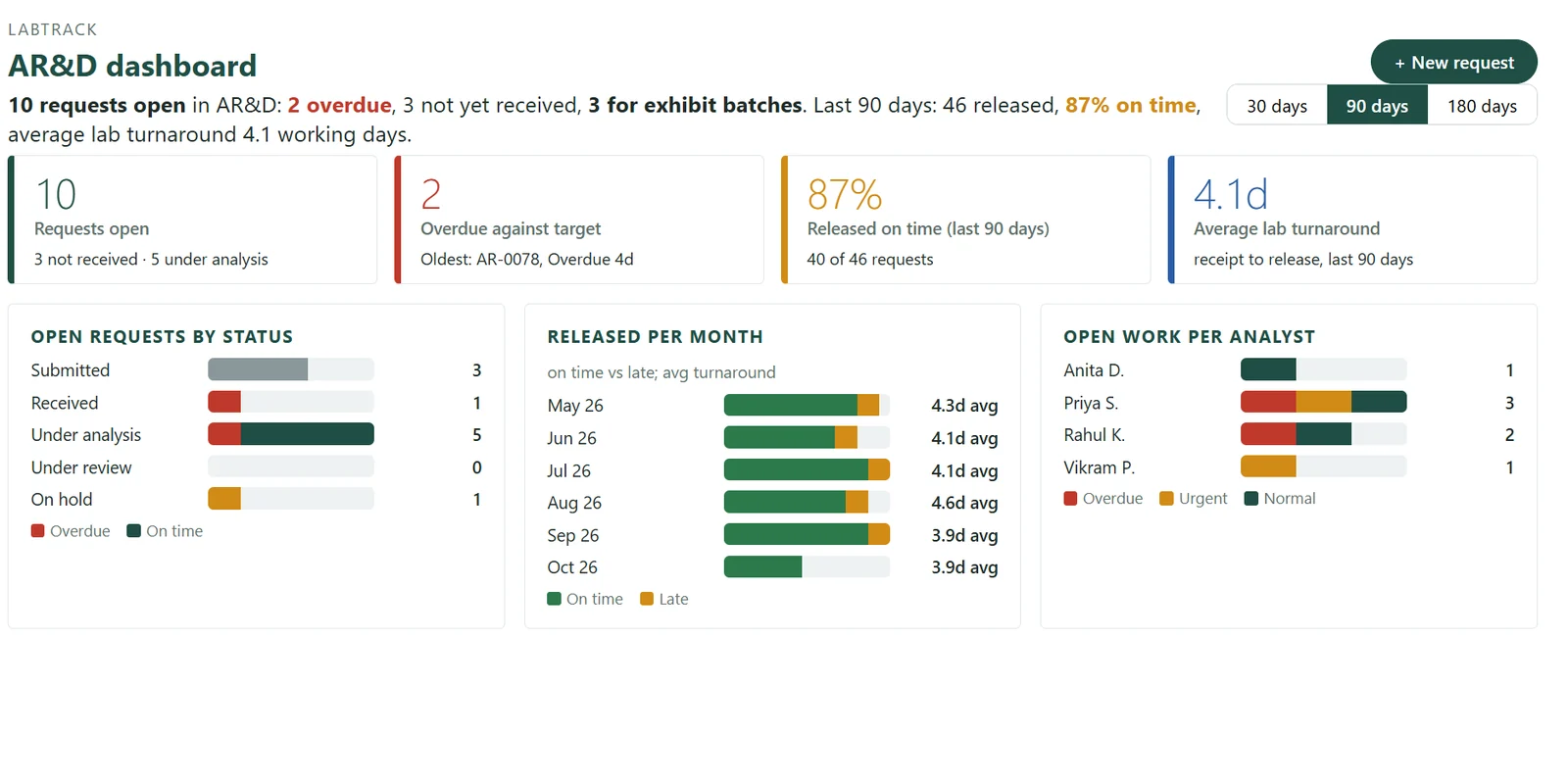
AR&D dashboard 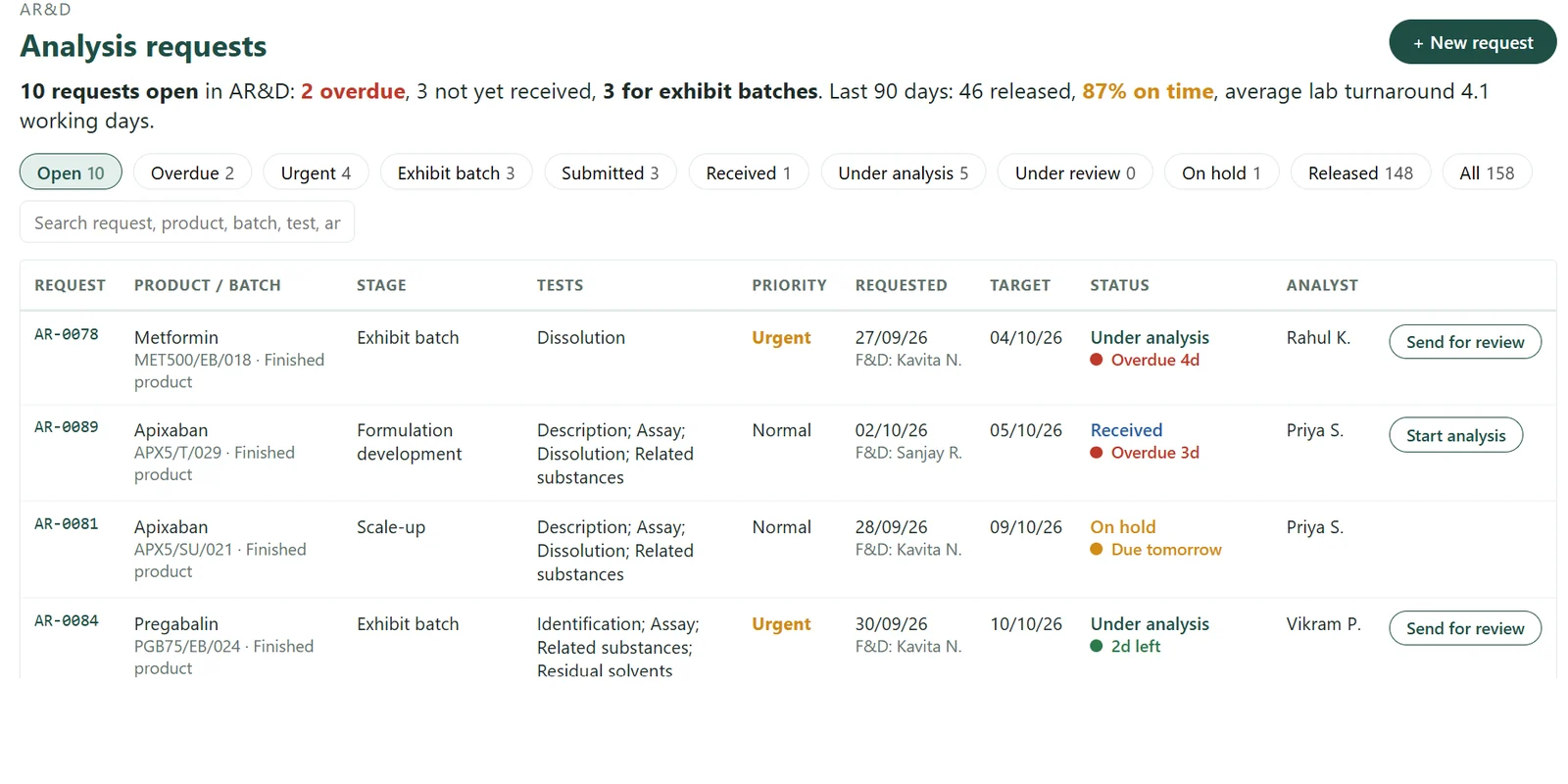
Analysis requests 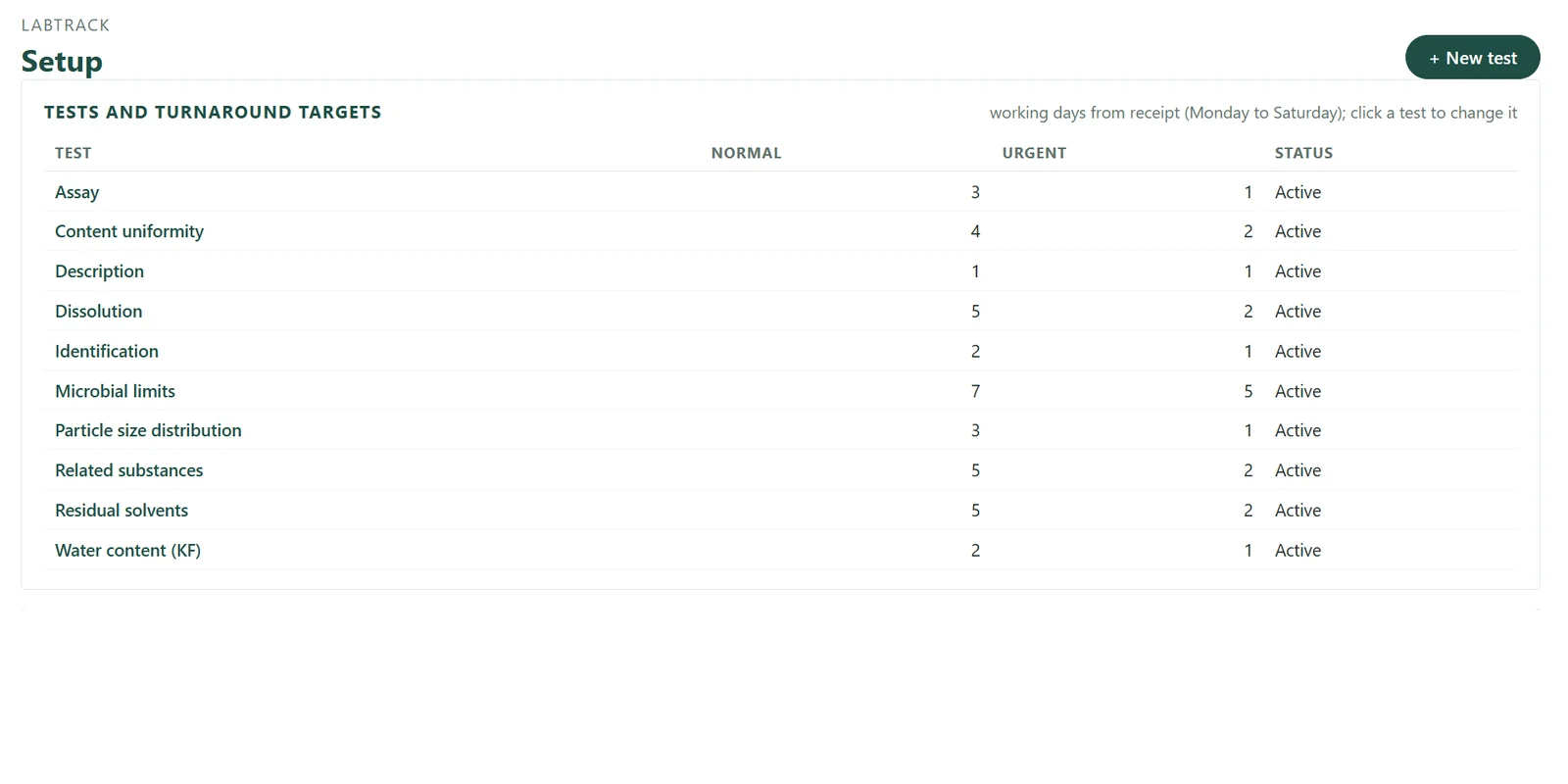
Turnaround targets
Indicative screenshots with sample data. Actual screens may vary with configuration.
Overview
What is lab request tracking?
Every laboratory request from receipt to release, with turnaround against target and the workload of each analyst in view.
Every request, one workflow
Submitted, received, in analysis, under review and released.
Turnaround against target
Target days for each test, for routine and urgent requests.
Workload at a glance
Open work by analyst, so priorities are clear.
For leadership: what you see
On-time release, backlog by test and analyst workload.
The question it answers
Is laboratory capacity delaying our projects or filings?
Start within a few weeks
One tracker, your current Excel imported, live inside your Microsoft 365.
Questions
Answered in seconds
Key features
Every request, from receipt to release
? Are laboratory results being released on time?
Request workflow
Submitted, received, in analysis, under review and released.
Turnaround targets
Target days for each test, for routine and urgent requests.
? Which analysts are carrying excess open work?
On-time performance
Measured over 30, 90 and 180 days.
Analyst workload
Open work by analyst, at a glance.
? Which tests have the longest turnaround?
Priority management
Routine and urgent work visible to the whole laboratory.
Requests by product
Laboratory activity by product and development stage.
How it works
How lab request tracking works
1. Raise the request
Each request is logged with its product, test and priority.
2. Follow its status
From received to released, visible to the requester.
3. Compare with target
Turnaround measured against the target for each test.
4. Review performance
On-time performance over 30, 90 and 180 days.
Example
Example: an urgent request lost in the queue
An illustrative scenario, not a client result.
A development team needs an urgent test result before deciding on a batch.
With email
The request sits in an inbox among routine work. The result arrives late and the decision waits.
With the Lab Tracker
The request is marked urgent and visible to the whole laboratory, so it is picked up first.
Who uses it
Leadership sees whether laboratory capacity is delaying projects or filings.
Laboratory heads monitor turnaround and workload.
Analysts update status as work progresses.
Requesters raise and follow their requests.
Works with
Stability Tracker
Pulled samples entering testing
NPD Project Management
Analytical activities within the project plan
CDMO Enquiry to Contract
Analytical support for customer projects
How you start
Engage with us – Experience measurable value within 30 days.
1
Choose one tracker
Begin where the pain is sharpest.
2
We study your environment and import your data
We review your Microsoft 365 setup and current Excel registers. History is retained where the data allows.
3
Live within a few weeks
Inside your existing Microsoft 365; no new servers.
4
Extend when it proves its value
Add trackers and the leadership view as you grow.
FAQ
Frequently asked questions
Does this replace our LIMS?
No. Results remain in your LIMS. The tracker manages requests, dates and turnaround, and it is not GxP-validated.
Can we define our own tests and target times?
Yes. Tests, target turnaround and the working week are configured to your laboratory.
Can we import our current requests?
Yes. Open requests are imported from your existing register at implementation.
How quickly can we start?
Typically within a few weeks, beginning with your existing registers in Excel.
Do we need new software?
No. The tracker runs within your existing Microsoft 365; no new servers are required.
Download the Lab Tracker brochure
A two-page overview of capabilities, sent to your email.
See the Lab Tracker with sample data
A guided walkthrough of your own process, led by PMSoft.